.svg)
LEDs in offices fail early from heat, poor drivers, bad power, long runtime, poor installation, and lack of maintenance.

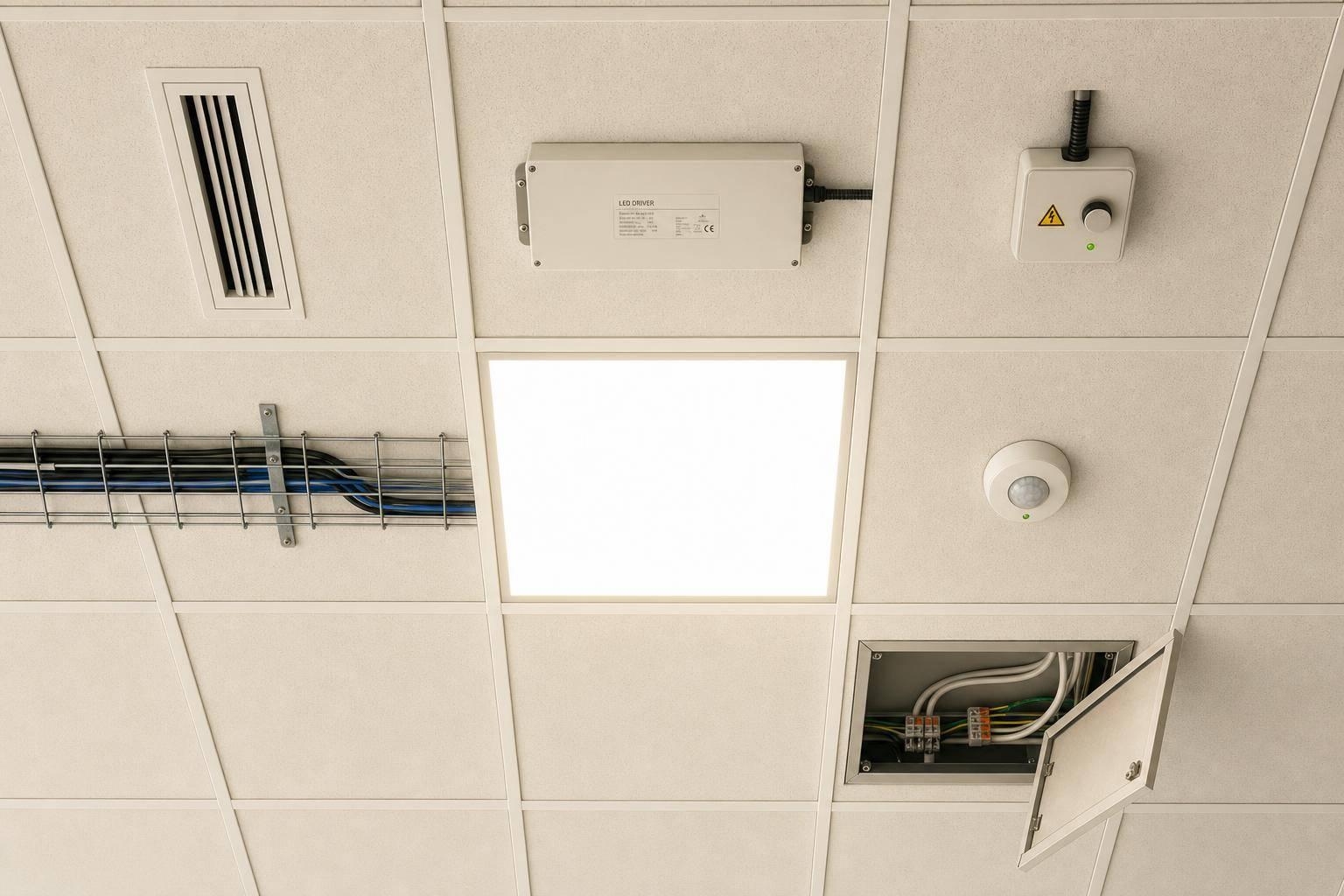
An LED rated for 50,000 hours can still fall short in an office. In most cases, life comes down to heat, driver quality, power conditions, runtime, installation, and upkeep - not just the number printed on the spec sheet.
If I had to sum it up in one line, it would be this: office LEDs last longer when the whole system is kept cool, stable, and maintained. The biggest trouble spots are often high ceiling heat, driver failure, voltage issues, and lights running longer than needed. That matters because driver repairs can cost $150–$300 per fixture in labor and access, and drivers make up 60%–80% of commercial LED luminaire failures.
Here’s the full picture at a glance:
| Factor | What it affects most | Early sign to watch |
|---|---|---|
| Heat & ambient temperature | Faster light loss | Early dimming, color shift |
| Fixture design | Heat buildup inside housing | Hot fixture body, diffuser wear |
| Driver quality | Early electronics failure | Flicker, buzzing, delayed start |
| Power quality | Driver stress and shutdowns | Cycling, repeat failures |
| Usage patterns & controls | Total runtime | Lights on too long, uneven response |
| Installation & placement | Extra heat and wiring stress | Hot spots, row-based failures |
| Maintenance & monitoring | Heat buildup and missed faults | Dust, sensor issues, avoidable outages |
In short, I’d treat LED lifespan in offices as a system issue, not a bulb issue. The article below breaks down the seven factors that have the biggest effect on how long a retrofit will hold up.
Office conditions are rarely as neat as lab tests. Ceiling plenums hold heat, and many fixtures stay on longer than test setups expect. So one headline number on a spec sheet doesn't tell the whole story.
LED systems also don't age in just one way. Light output drops over time, which cuts usable illumination. Color can drift, which changes how a space looks. And in many cases, the driver fails first and ends the fixture's service life before light loss becomes the main issue. In an office, the first thing to go often decides the real lifespan.
The U.S. Department of Energy explicitly notes that "lumen depreciation is not a proxy for luminaire lifetime" and recommends defining lifetime around light output while acknowledging other failure modes such as drivers, optics, and color shift.
That point matters because low-quality drivers can fail at 15,000–30,000 hours. When that happens, service life gets cut short and ownership costs climb.
For most offices, the better question isn't "What's the rated life?" It's what will this system cost to own over 10 to 15 years. That's where the weak spots show up: heat, drivers, power, controls, installation, and maintenance.
Heat cuts LED life. Every LED luminaire comes with a rated ambient temperature, and its life claim only holds if the fixture stays within that limit. Go past that limit and two things usually happen: light output drops faster, and the chance of failure goes up. In offices, this tends to show up first in ceiling plenums and enclosed fixtures.
For office spaces, the main issue is lumen depreciation. LLMF shows how much light output remains at the end of rated life. An L80 rating, for example, means the fixture still delivers 80% of its initial output at the end of its rated life.
To cut heat-related wear:
If steady light levels matter, luminaires with Constant Light Output (CLO) can increase output over time to offset lumen depreciation.
That approach only works if the fixture can shed heat well.
Even if an office stays within the stated temperature range, fixture design still decides how well heat gets out. Ambient temperature is only one piece of it. A fixture can still run too hot if it can’t pull heat away from the LED board.
Bad thermal design often leads to early light loss because the housing holds heat in. Extruded or die-cast aluminum heat sinks move heat away better than polymer housings. In office spaces, that usually shows up as lights dimming sooner than expected and more maintenance calls.
The whole heat path - from the LED junction to the surrounding air - needs to keep junction temperatures in a safe range. The fix is pretty simple: bond aluminum heat sinks directly to the LED boards so heat has a clear path out.
Driver placement matters too. In tight ceiling plenums, it helps to keep the driver separate from the LED cavity. That way, one hot compartment doesn’t warm up the other. When both share the same space, heat stress goes up and the life of both parts gets cut short.
A few red flags tend to show up early:
Ask for ISTMT data to check whether the fixture can handle actual ceiling conditions, not just lab conditions.
When heat can’t escape well, the driver takes a hit too. That’s why driver quality is the next big factor.
Once heat is under control, the driver is usually the next part to give out. In office retrofits, it often fails before the LED package itself. LED chips may carry ratings of 50,000 to 100,000 hours, but in many cases, the driver is what sets the fixture’s actual service life.
Heat speeds up driver wear, especially when capacitors start to age. In ceiling plenums with high ambient temperatures, that extra heat adds internal stress and cuts capacitor life. That’s why it makes sense to specify de-rating, thermal separation, and surge protection from the start.
De-rating the driver to about 80% of its maximum rated power helps reduce internal stress and heat build-up. And when a driver starts to struggle, the warning signs are usually pretty clear:
When these issues show up, replacing the driver can often bring the fixture back to normal without replacing the full luminaire.
Good sizing, surge protection, and fault monitoring help head off failures. BAS/BMS integration also gives facility teams an early heads-up. When these symptoms are tied into a BAS or BMS, they can trigger earlier service calls. That means teams can catch failing drivers before outages hit and avoid more emergency repair work.
If driver design sets the baseline, building power often decides how long that driver keeps going. Heat is one part of the story. Unstable power is another. When voltage runs about 10% above normal, driver electronics heat up fast and can fail early.
A test from Luleå University of Technology looked at 1,080 LED lamps and found catastrophic failures under constant overvoltage within 3,000 to 4,000 hours.
Overvoltage tends to break things fast. Harmonics are different. They add slower, cumulative stress. High total harmonic distortion (THD) keeps pressuring driver components even when fixtures still appear to be working fine.
Common warning signs include:
If voltage runs high, lower transformer tap settings by 2.5%, 5%, or 7.5%. It also helps to use drivers tested to IEC 61000-4-11 and IEC 61000-4-13. On top of that, track 5-minute RMS voltage readings so recurring high-voltage periods don't slip by unnoticed and cut equipment life short, leading to early replacements or unplanned downtime.
Once power quality is stable, usage patterns become the next major source of wear.
Once heat and power are in check, runtime becomes the next big factor. In office spaces, LED life comes down to how long the lights run. More hours each day means more wear. And when lights stay on after hours, the system racks up operating time faster and reaches end-of-life sooner.
Most office LED failures don't look dramatic. You usually won't see a sudden burnout. Instead, the more common pattern is gradual light loss, which can be easy to overlook.
CLO helps keep light levels on target by starting fixtures at a lower output and then increasing that output over time. The result is steadier illuminance. But there’s a tradeoff: power use goes up later in the fixture’s life, so that added load needs to be built into energy planning.
Occupancy sensors and daylight-dependent regulation cut total operating hours, which slows degradation. When lighting starts behaving unevenly, the cause is often the controls, not the LEDs. If fixtures respond inconsistently, check and recalibrate occupancy sensors before swapping out hardware.
Here are a few signs that usage patterns or controls may be affecting the system:
Even with solid controls, poor installation can still cut LED life short.
How a fixture is mounted, wired, and placed in the ceiling has a direct effect on lifespan. In most cases, the first warning signs are hot spots, flicker, and early driver failure.
In office retrofits, the driver is a common failure point. Poor installation takes normal heat stress and turns it into early driver failure. Tight plenums trap heat around the driver, which cuts its service life.
Even a well-designed fixture can fail early if its placement holds in heat or exposes it to shifting airflow. Hot-and-cold swings from nearby HVAC diffusers put stress on solder joints and connections. And when fixtures get buried under insulation, wear speeds up on both the phosphor and the driver.
Wiring problems can do the same kind of damage. A loose terminal connection creates a high-resistance point, which wears down the driver faster. Installing LED retrofits on old dimming circuits without checking compatibility also adds repeated current stress to the driver.
A few checks can catch these issues early:
In office retrofits, these mistakes often show up as uneven performance well before total failure.
Once the retrofit is in place, routine upkeep decides whether those earlier thermal and driver decisions hold up over time. Dust is a quiet troublemaker. It coats heat sinks, traps heat, pushes driver temperature up, and cuts into driver life.
Drivers fail at about 0.2% per 1,000 operating hours, and they account for an estimated 60%–80% of all LED luminaire failures in commercial settings. And when a driver does fail, the part itself often isn’t the main expense. Labor and access usually add $150–$300 per fixture, which makes up 70%–80% of total repair costs. That’s why early detection matters so much. It’s far cheaper to deal with a small issue than to wait for a fixture to go dark.
The warning signs most tied to upkeep are pretty simple: sensor faults and lights staying on in empty rooms. In day-to-day building use, both usually point to control circuit problems that routine inspections can catch before they turn into full failures.
Preventive maintenance comes down to three core tasks:
In real office spaces, these are the checks that keep light levels steady and service calls under control.
In offices, these risks usually overlap. The seven factors in this article rarely show up one at a time. They pile up, and that stack can quietly cut fixture life well before the spec sheet says it should.
Recessed LED fixtures in office ceilings can run hotter than planned when room temperatures climb. In these fixtures, most input power turns into heat, and the driver often ends up setting the fixture’s actual service life. That’s why heat sinks and driver quality matter more than many teams think.
Heat is a big part of the story, but controls often shape how much of that heat turns into wear. Occupancy sensors in conference rooms and open-plan areas can cut operating hours in a major way. Presence detection alone can reduce effective burn time by as much as 1,250 hours per year, which helps slow lumen depreciation. Motion-based controls work well for the same reason. If lights stay on after people leave, or if control settings don’t match how the space is used, those extra hours stack up fast and chip away at service life. Energy audits can show where presence detection or dimming would have the biggest impact.
Even with smart controls in place, unstable power can still wear drivers down early. Power quality still matters in office settings because drivers are sensitive to voltage swings and distortion. Keeping electrical conditions within rated targets helps protect performance over time.
A site evaluation, paired with energy audits and photometric layouts, can flag heat, runtime, and maintenance risks before a retrofit goes in. A photometric layout may begin above target to account for long-term light loss. Those checks feed the risk comparison table below.
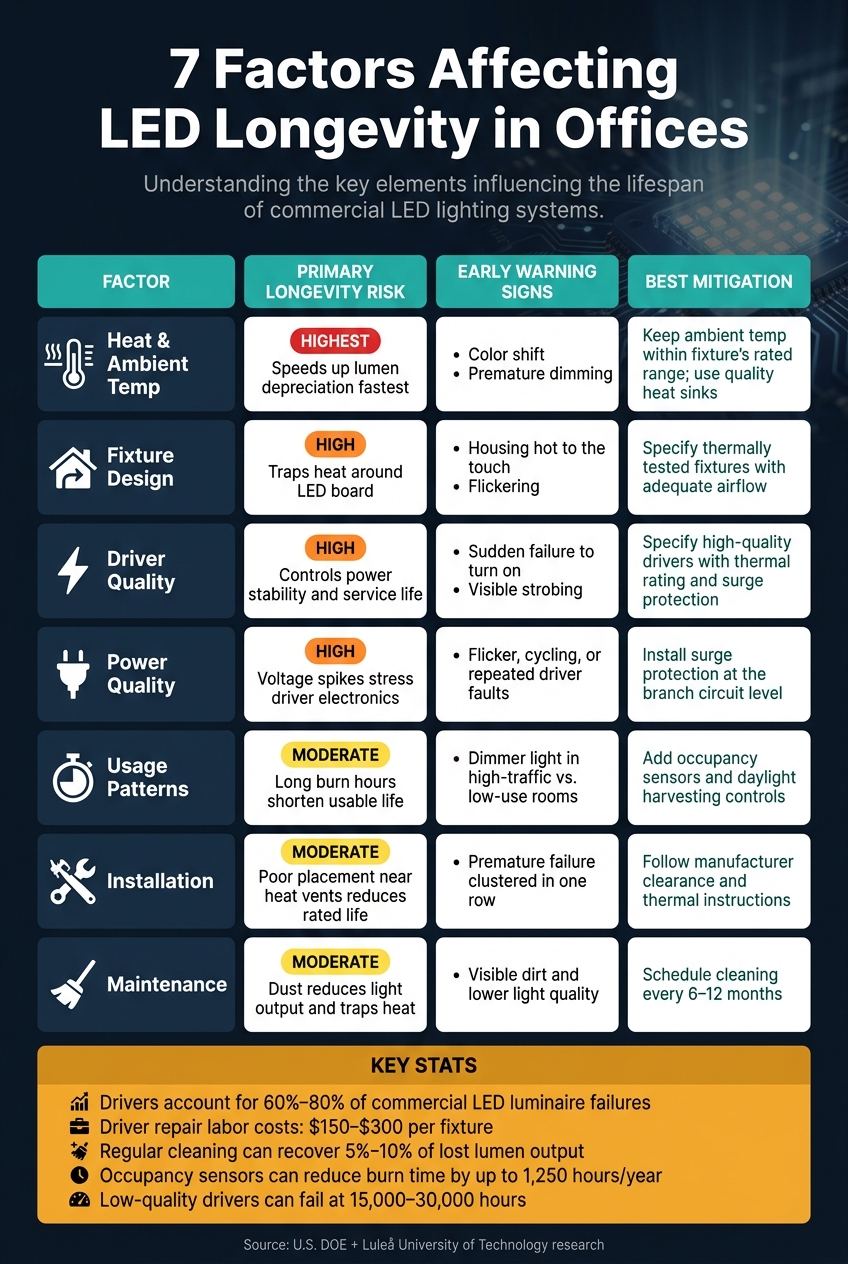
7 Factors Affecting LED Longevity in Offices: Risk, Signs & Fixes
The table below compares each factor by risk, signs, and mitigation. Use it to spot the weakest parts of your office retrofit.
| Factor | Primary Longevity Risk | Early Indicators | Best Mitigation |
|---|---|---|---|
| 1. Heat & Ambient Temp | Highest risk - speeds up lumen depreciation fastest | Color shift; premature dimming | Keep ambient temperature within the fixture's rated range; use quality heat sinks |
| 2. Fixture Design | Restricts airflow, trapping heat around the LED board | Housing hot to the touch; flickering | Specify thermally tested fixtures with adequate airflow |
| 3. Driver Quality | Controls power stability and service life | Sudden failure to turn on; visible strobing | Specify high-quality drivers with proper thermal rating and surge protection |
| 4. Power Quality | Voltage spikes stress driver electronics | Flicker, cycling, or repeated driver faults | Install surge protection at the branch circuit level |
| 5. Usage Patterns | Long burn hours shorten usable life | Dimmer light in high-traffic zones vs. low-use rooms | Add occupancy sensors and daylight harvesting controls |
| 6. Installation | Poor placement near heat vents reduces rated life | Premature failure of specific fixtures clustered in one row | Follow manufacturer clearance and thermal instructions |
| 7. Maintenance | Dust and grime reduce light output and trap heat | Visible dirt and lower light quality | Schedule regular cleaning on a 6- to 12-month cycle |
In most offices, heat is the main troublemaker. If a fixture runs hot, or sits in a housing that can't shed heat well, its light output can drop sooner than expected. Driver issues and poor power quality can also hit hard, especially when flicker or random failures start showing up.
Usage matters too. A conference room used a few hours a day won't age the same way as an open office with lights on from early morning to late evening. And sometimes the problem isn't the product at all. It's the install location, blocked airflow, or a layer of dust that's been sitting there for months.
The right priority comes down to how the office operates, where heat builds up, and how long the lights stay on each day.
Office LED life doesn’t come down to one line on a datasheet. The seven factors above shape whether an office retrofit gets anywhere close to its rated life. In plain English: long life depends on what happens after install too, especially heat, power, controls, and maintenance.
The office LED setups that last the longest are planned as a single system, not a stack of separate parts. Occupancy and daylight controls alone can add 20%–60% more energy savings, and that same approach may also help unlock utility rebates and 179D tax deductions.
If you’re planning an office LED retrofit, Luminate Lighting Group offers energy audits, photometric layouts, and turnkey retrofit process built around all seven factors.
Heat stress can cut an LED’s lifespan by permanently lowering its light output. One of the clearest signs is a slow fade in brightness over time, known as lumen depreciation.
This issue often shows up in older fixtures that were retrofitted for LEDs. The original housings can hold in heat, which speeds up the decline. You may also notice yellowing or cracking in optical parts, both of which can signal long periods of thermal stress.
LED drivers often fail first because they pack in several electronic parts that don’t handle heat and electrical stress very well. The usual trouble spots are electrolytic capacitors, MOSFETs, and solder joints.
Heat and humidity can wear down the driver over time. Power-quality problems, like transients, can hit the circuitry hard. Temperature cycling adds another layer of stress by expanding and contracting parts and interconnects, which can lead to cracks or other damage.
The result is pretty simple: the driver can fail all at once even when the LED package itself is still in good shape. In many lighting systems, the driver ends up being the weakest link long before the LEDs reach end-of-life.
To help office LEDs last longer, keep maintenance focused on heat and electronics.


